
Download Postfluencer – AI‑Powered LinkedIn Post Generator
Overview of Postfluencer
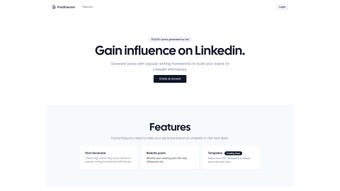
Postfluencer is a specialized AI writing assistant crafted to simplify the creation of LinkedIn posts. In an era where professional branding and network engagement hinge on consistent, high‑quality content, this tool offers a streamlined workflow that turns a simple idea into a polished post in seconds. By leveraging OpenAI’s language models, Postfluencer can understand user prompts, apply proven storytelling frameworks, and output copy that resonates with LinkedIn’s audience.
Whether you are a marketer looking to amplify campaign messages, a thought leader aiming to share insights, or a job seeker wanting to showcase achievements, Postfluencer adapts to diverse objectives while maintaining a tone appropriate for the platform. Its user‑friendly interface eliminates the need for manual copy‑editing, allowing you to focus on strategy rather than the mechanics of writing. While it is currently limited to LinkedIn posts and supports only English, the depth of customization—ranging from listicle formats to narrative arcs like Hero’s Journey—makes it a powerful ally for anyone serious about growing their professional presence online.
Key Features That Set Postfluencer Apart
- Framework Library: Choose from PCR, Story, Hero’s Journey, Simple, and more to match your communication style.
- Flexible Formats: Generate listicles, single‑paragraph narratives, or hybrid structures with a single click.
- AI‑Driven Accuracy: Powered by OpenAI, the tool produces grammatically correct, context‑aware copy.
- Personal Branding Boost: Consistent, high‑quality posts help establish authority and increase visibility on LinkedIn.
- User‑Friendly Dashboard: Intuitive design lets you input prompts, select frameworks, and preview results instantly.
- Instant Updates: Regular algorithm enhancements ensure you always have access to the latest writing trends.
- Secure Cloud Processing: All data is encrypted during transmission, safeguarding your ideas and business information.
How These Features Translate Into Real‑World Benefits
The framework library is more than a menu; it is a strategic toolbox that aligns your message with proven storytelling techniques. For instance, the Hero’s Journey framework can turn a simple product launch into an epic narrative, capturing attention in a crowded feed. Flexible formats mean you can test what works best for your audience—listicles tend to generate higher engagement for “how‑to” content, while concise paragraphs work well for thought‑leadership pieces.
Because the AI engine is constantly learning from a massive corpus of professional writing, the generated copy often mirrors the tone of top influencers, helping you blend in while still standing out. The dashboard’s simplicity reduces the learning curve, allowing even non‑writers to produce polished posts in under two minutes. Finally, the secure cloud processing assures enterprises that confidential project details remain private, a crucial consideration for B2B marketers.
Installation & Step‑by‑Step Usage Guide
Getting Started: Download and Account Creation
Postfluencer is a web‑based SaaS solution, so there is no traditional “installation” process. To begin, visit the official website and click the Download button, which redirects you to a secure sign‑up page. After entering your email address and creating a password, you will receive a verification link. Once verified, you can log into the dashboard from any modern browser on Windows, macOS, Android, or iOS devices. A free trial provides 20 generated posts, after which you can upgrade to a monthly or annual plan via the offers section.
Creating Your First LinkedIn Post
1. Enter Your Prompt: In the main text box, type a brief description of the topic you want to discuss—e.g., “Tips for remote team collaboration.”
2. Select a Framework: Choose the desired structure from the dropdown menu (PCR, Story, Hero’s Journey, Simple).
Each framework comes with a tooltip explaining its ideal use case.
3. Choose a Format: Toggle between “Listicle” or “Paragraph” to dictate the visual layout of the final copy.
4. Generate: Click the “Generate Post” button.
Within seconds, Postfluencer returns a fully formed LinkedIn post, complete with hashtags and a suggested call‑to‑action.
5. Review & Edit: Use the built‑in editor to make minor tweaks, add emojis, or insert links. The AI suggestions are editable, ensuring the final output reflects your voice.
6.
Publish Directly: With the integrated LinkedIn API (available on the Pro plan), you can publish the post without leaving the dashboard, or simply copy the text and paste it into LinkedIn manually.
Tips for Maximizing Efficiency
To get the most out of Postfluencer, keep your prompts concise yet specific; the AI performs best when it knows the target audience and desired outcome. Experiment with different frameworks for the same topic to discover which structure drives the highest engagement. Use the “Save Template” feature to store recurring prompts for future campaigns, reducing the time spent on repetitive tasks. Finally, monitor the built‑in analytics (available on premium tiers) to see which posts generate the most likes, comments, and shares, then refine your prompt strategy accordingly.
Compatibility, Pros, and Cons
Supported Operating Systems
Because Postfluencer is cloud‑based, it works on any device with a modern web browser. Officially supported platforms include:
- Windows 10/11 (Chrome, Edge, Firefox)
- macOS Monterey and later (Safari, Chrome, Firefox)
- Android 9+ (Chrome, Firefox)
- iOS 14+ (Safari, Chrome)
No additional plugins or extensions are required, and the service adheres to GDPR and CCPA standards for data privacy.
Pros and Cons
- Pros:
- AI‑generated content tailored to LinkedIn’s professional tone.
- Multiple storytelling frameworks increase creative flexibility.
- Instant preview and editable output streamline the publishing workflow.
- Secure, cloud‑based processing ensures data protection.
- Free trial and affordable subscription tiers make it accessible for freelancers and enterprises alike.
- Cons:
- Limited to LinkedIn posts; cannot generate content for other social platforms.
- Framework selection is manual; no automatic recommendation based on prompt analysis.
- No multilingual support, restricting use to English‑speaking audiences.
- Batch processing is unavailable; each post must be generated individually.
- Advanced publishing integrations (e.g., direct scheduling) require higher‑tier plans.
Is Postfluencer Worth the Investment?
For professionals who spend a significant amount of time crafting LinkedIn content, Postfluencer offers a clear ROI by cutting down writing time by up to 80 % and improving post quality. The platform’s constraints—single‑platform focus and lack of multilingual capabilities—are offset by its depth of customization and AI accuracy. Teams that need bulk content creation or multilingual outreach may need supplementary tools, but for core LinkedIn marketing, Postfluencer stands out as a cost‑effective, high‑impact solution.
Frequently Asked Questions
Can I use Postfluencer for platforms other than LinkedIn?
Currently, Postfluencer is optimized solely for LinkedIn posts. The AI model and framework library are tuned to LinkedIn’s character limits, audience expectations, and professional tone. Future updates may expand support to other platforms, but for now, it’s a dedicated LinkedIn tool.
Is there a free version or trial available?
Yes, Postfluencer offers a 14‑day free trial that includes up to 20 generated posts. This allows users to evaluate the AI quality and workflow before committing to a paid subscription.
How secure is my data when I generate posts?
All data transmitted between your browser and Postfluencer’s servers is encrypted with TLS 1.3. The service complies with GDPR and CCPA, ensuring that personal and business information remains confidential.
Can I schedule posts directly from Postfluencer?
Scheduling is available only on the Enterprise tier, which includes integration with LinkedIn’s API for direct publishing and scheduling. Lower tiers provide copy generation only, requiring manual posting.
What kind of support does Postfluencer offer?
Users have access to a knowledge base, email support, and live chat during business hours. Premium subscribers receive priority response times and a dedicated account manager.
Conclusion – Should You Download Postfluencer?
In the competitive landscape of LinkedIn marketing, having a reliable, AI‑powered writing assistant can be the difference between being heard and being ignored. Postfluencer delivers on its promise: it generates high‑quality, framework‑driven posts quickly, helping you maintain a consistent content calendar while reinforcing your personal or corporate brand. Its limitations—single‑platform focus, lack of multilingual output, and manual framework selection—are transparent and manageable for most professionals whose primary goal is to dominate LinkedIn. If you’re looking for a secure, easy‑to‑use tool that reduces the time spent on copywriting and boosts engagement, the answer is a clear yes. Click the download button below, start your free trial, and experience how automated storytelling can transform your LinkedIn presence.
Download Postfluencer now and unlock the power of AI‑enhanced LinkedIn content.



.png)



